
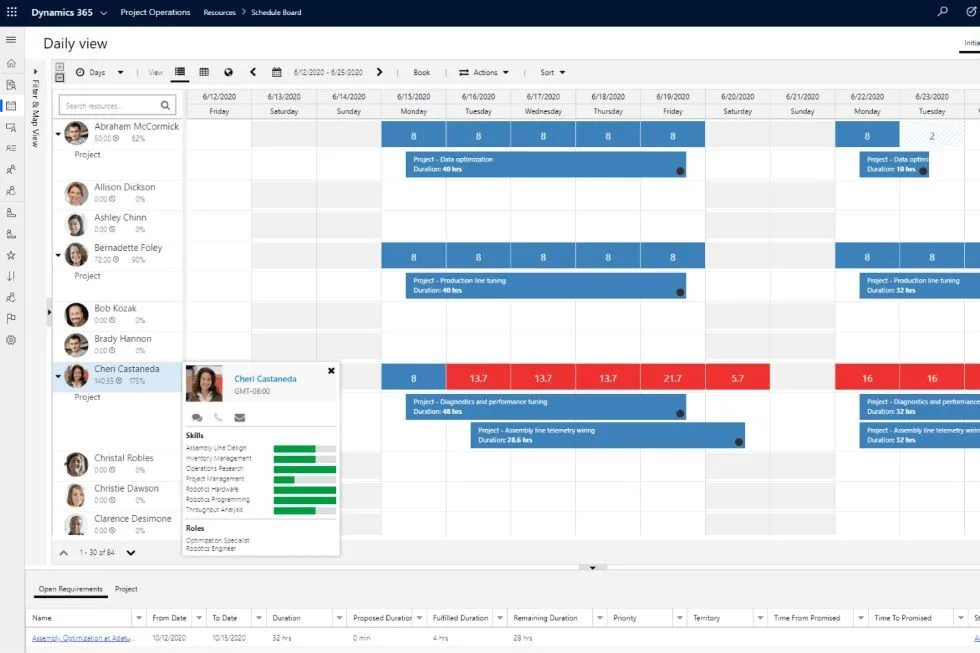
Microsoft lists Dynamics 365 Project Operations at $135 per user/month, paid yearly for full users.
Microsoft may also offer lower-cost licensing options for qualifying users who already have another Dynamics 365 qualifying app. Pricing can vary by region, agreement type, licensing program, and Microsoft updates, so companies should always confirm current pricing with Microsoft or their licensing partner.
The important point is this: pricing tells you what the license costs. It does not tell you whether Project Operations is the right fit for your project business.
For project-centric companies, the bigger question is whether the system gives you the right project financial control, forecasting, governance, scheduling, procurement visibility, and connection to Microsoft Dynamics 365 Finance.
What are your options for managing projects in D365 Finance?
What does Dynamics 365 Project Operations pricing include?
Dynamics 365 Project Operations is Microsoft’s project application for managing project sales, planning, resourcing, time, expenses, project accounting, and billing.
Depending on how Project Operations is deployed and configured, companies may use different combinations of:
- Project sales
- Project contracts
- Resource management
- Project planning
- Time and expense entry
- Project accounting
- Billing
- Revenue recognition
- Reporting
But pricing alone does not explain how those capabilities will work in your environment.
Project Operations can be deployed in different ways, and those deployment choices matter. A company using Project Operations mainly through Dynamics 365 Finance will have a different experience than a company relying more heavily on Customer Engagement / Dataverse capabilities.
Why deployment type matters for pricing
Two companies can pay for Project Operations and still have very different implementations.
That is because the license price is only one part of the decision. The real cost depends on what the company needs Project Operations to do and how the solution has to be deployed.
Before evaluating Project Operations pricing, companies should understand:
- Which deployment type fits their business
- Which users need full access
- Which users only need limited access
- Whether the company needs project sales and PSA-style workflows
- Whether project accounting inside D365 Finance is the main requirement
- Whether project managers need stronger planning, forecasting, and financial control
- Whether additional configuration, extensions, integrations, or reporting will be required
For many companies, the license price is not the main issue. The larger issue is whether the architecture supports the way the project business actually works.
Pricing is not the same as total cost
Project Operations pricing is the subscription cost. It is not the full cost of using the system successfully.
Companies should also consider:
- Implementation cost
- Configuration effort
- Data migration
- Training
- Reporting setup
- Integration requirements
- Process redesign and workarounds needed
- Change management
- Ongoing administration
These costs matter because Project Operations is not just a license. It is a business system that has to support how projects are sold, planned, staffed, executed, billed, forecasted, and controlled.
For services-led companies with relatively standard project delivery needs, Project Operations may be a reasonable fit.
For project-centric companies with deeper requirements around project financial control, forecasting, procurement coordination, schedule-to-budget alignment, governance, and month-end project control, pricing should be evaluated against the full operating model.
What should project-centric companies be careful about?
Project-centric companies should be careful about assuming that Project Operations pricing answers the fit question.
The license may be clear. The operational fit may not be.
Project-centric companies often need capabilities such as:
- Strong project financial control
- Forecasting and estimate-at-completion governance
- Separate but connected schedule and cost structures
- Project-driven procurement visibility
- Change control
- Risk and issue management
- Portfolio visibility
- Month-end project review processes
- Direct alignment with D365 Finance
If those needs are central to the business, the company should evaluate more than the monthly user price.
The better question is not only, “How much does Project Operations cost?”
The better question is, “Will this Microsoft Dynamics approach support how our project business needs to work?”
How does PlanAutomate compare?
PlanAutomate is designed for project-centric companies that want project management, project execution, forecasting, costing, governance, and financial control inside Microsoft Dynamics 365 Finance.
It is not built on Dynamics 365 Project Operations and does not require Project Operations.
PlanAutomate builds on the project accounting foundation in D365 Finance and adds deeper project business capabilities for companies that need more than standard project accounting or PSA-style workflows.
That matters because the lowest-cost license is not always the safest business decision. Companies should evaluate the total cost of the solution, the implementation path, and whether the system can support the way projects are actually managed.
Furthermore, the PlanAutomate Essentials package comes at the same price as Project Operations. That gives you more capabilities with more options to grow into for the same price.
When should a company compare Project Operations alternatives?
A company should compare Project Operations alternatives when the business needs stronger project financial control, deeper forecasting, tighter D365 Finance alignment, or more complete project business management than Project Operations can reasonably provide.
This is especially important when project success depends on:
- Accurate project forecasts
- Cost control
- Schedule and budget alignment
- Project-driven procurement
- Month-end project governance
- Executive visibility
- Managing work inside the ERP instead of disconnected tools
Project Operations may still be a good fit for some companies. But project-centric companies should evaluate whether it is the right fit before making the licensing decision.
Short Answer
Dynamics 365 Project Operations is listed by Microsoft at $135 per user/month, paid yearly for full users. See Microsoft website here.
But pricing alone does not determine whether Project Operations is the right solution. Companies should evaluate deployment type, implementation cost, required capabilities, D365 Finance alignment, and the level of project financial control they need.
For project-centric companies, PlanAutomate may be a better fit when the business needs stronger project financial control, forecasting, governance, scheduling, procurement visibility, and project execution inside Microsoft Dynamics 365 Finance.
Evaluating the right Microsoft Dynamics path for project management?
Adeaca can help you compare D365 Finance, Project Operations, and PlanAutomate based on how your project business actually works.
