
Microsoft Dynamics 365 Project Operations for Project-Centric Companies
Dynamics 365 Project Operations is Microsoft’s project application for project sales, delivery, resources, time, expenses, and project financials. It can be a fit for some services-led organizations.
If you need a broader definition first, start with What is Dynamics 365 Project Operations?
Is Project Operations right for you?
For project-centric companies running or evaluating D365 Finance, the bigger question is whether Project Operations gives you the right operating model. Project delivery, project financial control, forecasting, billing, scheduling, and reporting need to stay connected without creating unnecessary process splits or future workarounds.
Adeaca helps project-centric companies evaluate where Project Operations fits, where it may fall short, and whether a D365 Finance-native path with PlanAutomate is the safer choice.
Where Project Operations Fits
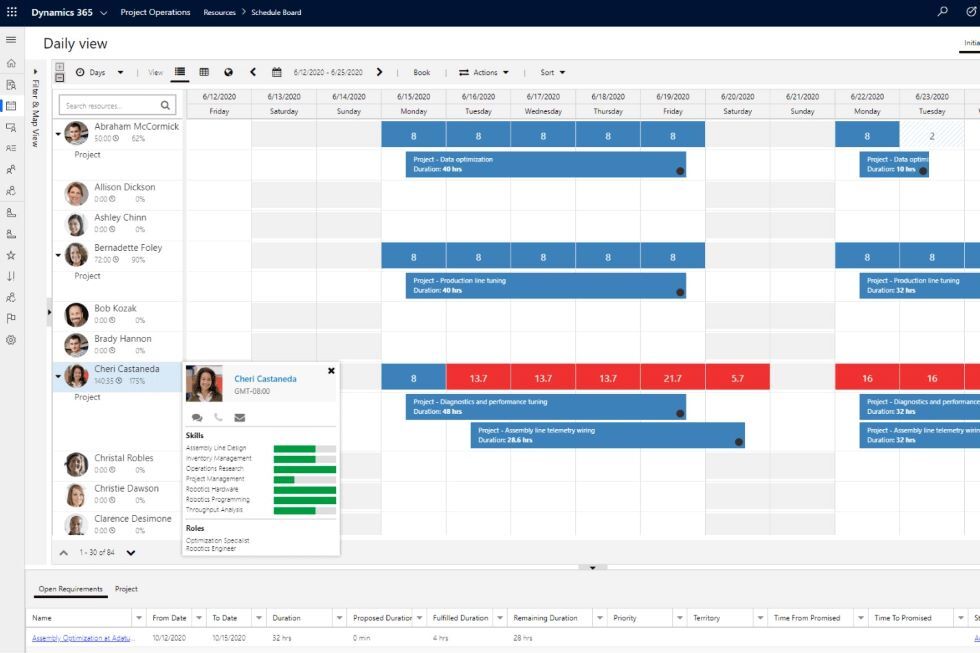
Project Operations can be a fit when your needs center on project sales, basic project delivery, time and expense, resource management, and services automation.
It is most relevant when the business is services-led and projects are relatively simple, short, and aligned with the standard Project Operations architecture. The key question is whether your organization can work within that standard architecture or needs a broader D365 Finance-native project business platform.
Where project-centric companies should be careful
Project Operations can support important project processes, but project-centric companies should look closely at how it handles the connection between project delivery and financial control. The risk is not just missing features. The risk is choosing an operating model that creates workarounds, process splits, or limits as the business grows.
Project financial control
Project-centric companies need reliable control over budgets, actuals, commitments, forecasts, margins, revenue, and profitability. If those controls are difficult to manage inside D365 Finance, the system can become harder to trust.
Forecasting and EAC
Many project businesses need estimate-at-completion, forecast versions, scenario planning, and early visibility into margin or cost risk. These requirements should be evaluated before committing to the standard Project Operations path.
Billing and revenue complexity
Contract types, billing rules, milestone billing, retainage, change orders, and revenue recognition can become difficult if project execution and finance are not tightly connected.
Scheduling depth
Project-centric companies often need deeper WBS planning, dependencies, baselines, progress tracking, schedule risk visibility, and alignment between schedule, cost, and resources.
Cost breakdown structures
A strong project business often needs cost structures that match how work is planned, executed, controlled, and reported. If the cost structure is too limited, reporting and control can suffer.
Governance and change control
Projects need clear controls around scope, changes, approvals, risks, issues, dependencies, and executive oversight. Weak governance creates risk as project volume and complexity grow.
CRM and ERP process split
If project work requires too much movement between customer engagement and finance, teams can end up with process friction, duplicate effort, and less reliable project data.
Executive visibility
Leaders need one reliable view of project performance, margin, risk, resource demand, and financial impact. If reporting depends on disconnected systems or manual workarounds, decisions slow down.
If these areas matter to your business, compare Project Operations against a D365 Finance-native project business platform before building around the standard architecture.
Compare Features
Get the most options for your business now and in the future.
|
Compare to:
|
PlanAutomate Essentials
Base
€135 /mo
|
AEC
Add-on
€60 /mo
|
ETO Manufacturing
Add-on
€60 /mo
|
Professional Services
Add-on
€60 /mo
|
Insight & Analysis
Add-on
€30 /mo
|
Governance
Add-on
€30 /mo
|
Advanced PM
Add-on
€60 /mo
|
Project Modeling
Add-on
€20 /mo
|
Risk Mgmt.
Add-on
€20 /mo
|
||||||
|---|---|---|---|---|---|---|---|---|---|---|---|---|---|---|---|
|
Insights and analysis
|
|||||||||||||||
| Power BI cubes | |||||||||||||||
| Embedded Power BI reports | |||||||||||||||
| Portfolio analytics | |||||||||||||||
| Portfolio performance | |||||||||||||||
| Performance index | |||||||||||||||
| PlanVector AI (see agents below) | |||||||||||||||
|
AI Agents
|
|||||||||||||||
| Planner agent | |||||||||||||||
| RAIDO agent | |||||||||||||||
| Costing agent | |||||||||||||||
| Change management agent | |||||||||||||||
| Staffing agent | |||||||||||||||
| Reporting agent | |||||||||||||||
| PayFlow | |||||||||||||||
| Time Entry & Expense | |||||||||||||||
|
Planning
|
|||||||||||||||
| Work Breakdown Structure (WBS) | |||||||||||||||
| Gantt & drag and drop | |||||||||||||||
| Critical path and float | |||||||||||||||
| Task network | |||||||||||||||
| Role and resource scheduling | |||||||||||||||
| Capacity management | |||||||||||||||
| Soft/hard commit | |||||||||||||||
| Auto assign resources | |||||||||||||||
| Task and Gantt filtering | |||||||||||||||
| Task workflow | |||||||||||||||
| Custom grid views | |||||||||||||||
| Activity backlog | |||||||||||||||
| WBS sensor points | |||||||||||||||
| Manual tasks | |||||||||||||||
| Material planning | |||||||||||||||
| Material constraints | |||||||||||||||
| What-if simulation | |||||||||||||||
| Capacity leveling | |||||||||||||||
| Task driven serviceline and line property | |||||||||||||||
| Custom project/role/task attributes | |||||||||||||||
| Baselines | |||||||||||||||
| Embedded projects (WBS) | |||||||||||||||
| Constraint types | |||||||||||||||
| Gateway reviews and deadline management | |||||||||||||||
| Task tags | |||||||||||||||
| Project calendar | |||||||||||||||
| Project phases | |||||||||||||||
| Schedule backwards from finish | |||||||||||||||
|
Estimation
|
|||||||||||||||
| Budget versions | |||||||||||||||
| Templates | |||||||||||||||
| Create from quote | |||||||||||||||
| Create from existing project | |||||||||||||||
| Approvals | |||||||||||||||
| Copy from WBS | |||||||||||||||
| Import/Export XML | |||||||||||||||
| Cashflow | |||||||||||||||
| Qty budgets | |||||||||||||||
| Retainers | |||||||||||||||
| Models | |||||||||||||||
|
Cost breakdown structure
|
|||||||||||||||
| Embedded projects (CBS) | |||||||||||||||
| Posting status | |||||||||||||||
| EVA principles | |||||||||||||||
| Cost codes & cost code reporting | |||||||||||||||
| Period close | |||||||||||||||
|
Portfolio organization
|
|||||||||||||||
| Stakeholder workspace | |||||||||||||||
| Auto pilot | |||||||||||||||
| Project sensor points | |||||||||||||||
| Stakeholders | |||||||||||||||
| POS security | |||||||||||||||
| Batch lists | |||||||||||||||
|
Risk management
|
|||||||||||||||
| RAIDO register | |||||||||||||||
|
Costing sheet
|
|||||||||||||||
| Cost (view) | |||||||||||||||
| Revenue (view) | |||||||||||||||
| By category | |||||||||||||||
| By category group | |||||||||||||||
| Embedded projects | |||||||||||||||
| CTC and EAC | |||||||||||||||
| Variance tracking | |||||||||||||||
| Contract line items (view) | |||||||||||||||
| Dedicated Cost Breakdown Structure (CBS) | |||||||||||||||
| Budget periods | |||||||||||||||
| CBS sensor points | |||||||||||||||
| Variance reason codes | |||||||||||||||
| Deliverables (view) | |||||||||||||||
| Change control (view) | |||||||||||||||
| WBS estimate (view) | |||||||||||||||
| Revenue to complete (view) | |||||||||||||||
| Get WBS estimates | |||||||||||||||
| Retainer | |||||||||||||||
| Burn rate (view) | |||||||||||||||
| Earned value (view) | |||||||||||||||
| RAIDO (view) | |||||||||||||||
| Labor quantities (view) | |||||||||||||||
| Cashflow | |||||||||||||||
|
Portfolio management
|
|||||||||||||||
| Project portfolios | |||||||||||||||
| Portfolio status | |||||||||||||||
| Portfolio sensor points | |||||||||||||||
| Project breakdown structure | |||||||||||||||
| Project budget periods | |||||||||||||||
|
Change management
|
|||||||||||||||
| Revisions | |||||||||||||||
| Change orders | |||||||||||||||
| Change requests | |||||||||||||||
| Copy Change set | |||||||||||||||
| Copy WBS | |||||||||||||||
| WBS change sets | |||||||||||||||
|
Resource management
|
|||||||||||||||
| Resource attributes | |||||||||||||||
| Calendars and exceptions | |||||||||||||||
| Resource loan management | |||||||||||||||
| Grade, service & location | |||||||||||||||
| Labor rates by grade and service line | |||||||||||||||
| Project resourcing (dispatch) | |||||||||||||||
|
Workspaces
|
|||||||||||||||
| Project management | |||||||||||||||
| Project team member | |||||||||||||||
| Project costing | |||||||||||||||
| Project planning | |||||||||||||||
| Project change management | |||||||||||||||
| Project capacity management | |||||||||||||||
| Project material constraints | |||||||||||||||
| Project subcontract management | |||||||||||||||
| Project stakeholder | |||||||||||||||
| Project period close | |||||||||||||||
| Project RAIDO | |||||||||||||||
|
Subcontract management
|
|||||||||||||||
| Subcontract management | |||||||||||||||
|
Timesheet management
|
|||||||||||||||
| My assignments & widget | |||||||||||||||
| Team member workspace | |||||||||||||||
| My calendar | |||||||||||||||
| Task status update | |||||||||||||||
| My tracked RAIDO | |||||||||||||||
|
Other
|
|||||||||||||||
| Fee Estimator | |||||||||||||||
| Electronic invoicing | |||||||||||||||
| Experience mgt. | |||||||||||||||
| Mobile access | |||||||||||||||
| AI Brief builder | |||||||||||||||
| Whitespace analysis | |||||||||||||||
| Copilot & AI Automation | |||||||||||||||
What if you could get more for the same price?
Get stronger project capabilities, better performance, and room to add functionality where your business needs it.
Project Operations
$135
user/m
Microsoft’s default project module for D365 Finance with standard project management capabilities with a single WBS structure and basic features. No upgrades or product expansions available.
Key Features
- Project scheduling (WBS)
- Resource & capacity management
- Quoting & Templates
- Costing & Budgeting
- Power BI reporting
vs.
PlanAutomate
$135
user/m
PlanAutomate Essentials has all the same project management functionality as Project Operations in a more capable system that’s embedded in D365 Finance. Plus, you gain the ability to grow into other features.
Key Features
- Project scheduling (WBS)
- Resource & capacity management
- Quoting & Templates
- Costing & Budgeting
- Power BI reporting
plus
- Faster performance for projects of any size
- Dedicated Cost Breakdown Structure (CBS) with periodization for better cost control
- Enhanced timesheets for streamlined time recording
- Change management controls
- Implementation led by project experts
- Ability to add on advanced features as you need for your industry or business (see here)
+$USD per user per month paid yearly.
Why project-centric companies choose PlanAutomate instead of building around Project Operations
PlanAutomate is not only for advanced requirements. It is often the safer starting point because companies can start with core project business capabilities and grow into deeper planning, forecasting, costing, governance, and resource management without changing architecture later.
Process-first Approach
We don’t just implement technology. We start with your business processes. Beyond implementation, we can analyze and reengineer your processes for optimal efficiency and then provide the technology to systemize them.
- Ensures your processes are set up in the most efficient manner
- Makes certain the system you use is aligned with your processes and delivers maximum value
Project Expertise
Our consultants come directly from project-driven organizations like yours with decades of complex project management experience and having gone through technology-driven transformations themselves.
- Ensures we understand your problems thoroughly
- Enables us to provide service beyond what anyone else in the Dynamics ecosystem can do
Broadest Technology Options
We turn Microsoft Dynamics 365 Finance into an operating system for your project business. Our flexible solution allows us to serve straightforward service organizations as well as the most complex engineering and project-driven manufacturing companies.
- Ensures you get the right set of technology to solve your problems
- Enables you to grow and scale your company on the same platform
PlanAutomate is the only partner in the Microsoft ecosystem with this distinct project-driven business focus.
For broader context on why project-centric companies need a different ERP model, see What is a Project ERP?
Evaluating Project Operations?
Compare the best path for your project-centric business.
Adeaca can help you compare the realistic paths for managing projects in D365 Finance and decide whether Project Operations, PlanAutomate, or another approach is the right fit.
The details of each option and how to evaluate them for your company.
How you can grow and scale your project management capabilities in the future.
What implementation with Adeaca looks like.
How PlanAutomate features compare to Project Operations and what is best for your company.