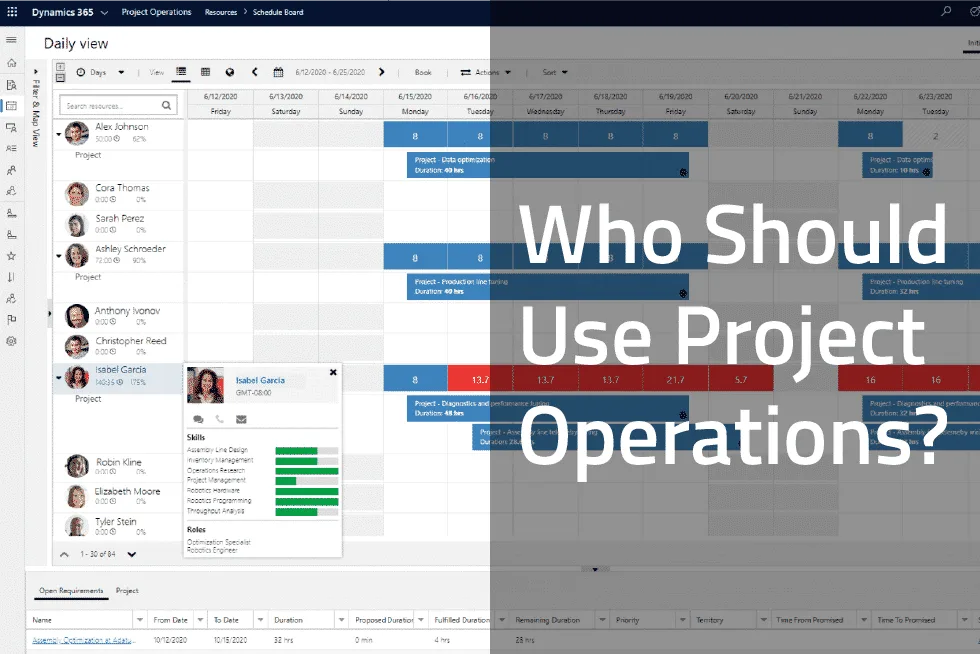
Microsoft Dynamics 365 Project Operations is a change and separation of the existing project management and accounting modules inside Dynamics 365 Finance as well as Project Service Automation (PSA). Going forward, the project functionality that used to come native to Dynamics 365 Finance and PSA is now merged into a separate SKU available as Project Operations.
This is a great question. Especially if you can get a more capable project system for the same price. See below.
Project Operations
$135
user/m
Microsoft’s default project module for D365 Finance with standard project management capabilities with a single WBS structure and basic features. No upgrades or product expansions available.
Key Features
Project scheduling (WBS)
Resource & capacity management
Quoting & Templates
Costing & Budgeting
Power BI reporting
vs.
PlanAutomate EPM
$135
user/m
Our core Enterprise Project Management (EPM) product has all the same project management functionality as Project Operations in a more capable system that’s embedded in D365 Finance. Plus, you gain the ability to grow into other features.
Key Features
Project scheduling (WBS)
Resource & capacity management
Quoting & Templates
Costing & Budgeting
Power BI reporting
plus
Faster performance for projects of any size
Dedicated Cost Breakdown Structure (CBS) with periodization for better cost control
Enhanced timesheets for streamlined time recording
Change management controls
Ability to add on advanced features as you need for your industry or business (see here)
+$USD per user per month paid yearly.
What if you need more than Project Operations can offer?
The longer and more complex your projects, the more you will need a solution that goes beyond what Project Operations can offer.
In short, if you are an AEC, project/ETO manufacturing, energy, biotech, aerospace, defense, or any project-driven company (what we call Project Business) trying to manage projects with various inputs, resources and that last longer than a month, you need to look beyond Project Operations. PlanAutomate is the smart choice because it can grow with your needs.
Why You Should Trust What We Say About Project Operations
PlanAutomate’s founder, Daniel Bevort, was the principal architect of the original Axapta ERP at Damgaard Data. As the story goes, Microsoft acquired Axapta for $1.6B and it became Microsoft Dynamics AX, which is now Dynamics 365 Finance.
It is because of our exclusive knowledge of Dynamics and Project Operations that we know it does not work for project business. Therefore, we have made it our mission to make Dynamics a business system for project-driven companies.
We have done detailed analysis of Project Operations and written a whitepaper with an honest assessment of its capabilities. See the table below for a taste. We have also written several articles on Project Operations that go through various functions that project businesses need and where Project Operations falls short.
← More
More →
Compare to:
MS D365 ProjOps.Microsoft
-
v
HSO AEC360 + ProjOps.
v
PlanAutomate EPM EssentialsBase
€135 /mo
+
AECAdd-on
€60 /mo
ETO ManufacturingAdd-on
€60 /mo
Professional ServicesAdd-on
€60 /mo
+
Insight & AnalysisAdd-on
€30 /mo
GovernanceAdd-on
€30 /mo
Advanced PMAdd-on
€60 /mo
Project ModelingAdd-on
€20 /mo
Risk Mgmt.Add-on
€20 /mo
Insights and analysis
Power BI cubes
◑
◑
●
Embedded Power BI reports
●
Portfolio analytics
●
Portfolio performance
●
Performance index
●
PlanVector AI (see agents below)
●
AI Agents
Planner agent
●
Critical Path Risk Assessment
●
Resource Bottleneck Mitigation
●
Stale data check
●
RAIDO agent
●
Create risk based RAIDO entries
●
Set RAIDO Probability & Impact Analysis
●
Assign RAIDO entries
●
Create RAIDO follow-up tasks
●
Costing agent
●
Identify critical trends
●
Analyze EAC
●
Monitor invoice backlog
●
Change management agent
●
Data-Driven Change Management Suggestions
●
Schedule Impact Analysis
●
Financial impact analysis
●
Staffing agent
●
Resource optimization
●
Alternative resource suggestions
●
Cost-Optimized Resource Sourcing
●
Reporting agent
●
Status Report
●
Trend Analysis
●
Projections & Forecasts
●
Root Cause Analysis
●
Post-Mortem Analysis
●
Risk Assessment
●
Counterfactual (What-if) Analysis
●
PayFlow
●
Time Entry & Expense
●
Planning
Work Breakdown Structure (WBS)
◑
◑
●
Gantt & drag and drop
●
●
●
Critical path and float
●
Task network
●
●
●
Role and resource scheduling
●
●
●
Capacity management
◑
◑
●
Soft/hard commit
●
●
●
Auto assign resources
●
●
●
Task and Gantt filtering
●
Task workflow
●
Custom grid views
●
Activity backlog
●
WBS sensor points
●
Manual tasks
●
●
●
●
Material planning
●
●
Material constraints
●
●
What-if simulation
●
●
●
Capacity leveling
●
●
●
Task driven serviceline and line property
●
●
●
Custom project/role/task attributes
●
●
●
Baselines
●
Embedded projects (WBS)
●
Constraint types
●
Gateway reviews and deadline management
●
Task tags
●
Project calendar
●
Project phases
●
Schedule backwards from finish
●
Estimation
Budget versions
◑
◑
●
Templates
●
●
●
Create from quote
●
●
●
Create from existing project
●
●
●
Approvals
●
●
●
Copy from WBS
●
●
●
Import/Export XML
●
Cashflow
●
Qty budgets
●
●
Retainers
●
Models
●
Cost breakdown structure
Embedded projects (CBS)
●
●
●
Posting status
●
EVA principles
●
Cost codes & cost code reporting
●
Period close
●
Portfolio organization
Stakeholder workspace
●
Auto pilot
●
Project sensor points
●
Stakeholders
●
POS security
●
Batch lists
●
Risk management
RAIDO register
●
Costing sheet
Cost (view)
●
●
●
Revenue (view)
●
●
●
By category
●
●
●
By category group
●
●
●
Embedded projects
●
●
●
CTC and EAC
◑
◑
●
Variance tracking
◑
◑
●
Contract line items (view)
●
Dedicated Cost Breakdown Structure (CBS)
●
Budget periods
●
CBS sensor points
●
Variance reason codes
●
Deliverables (view)
●
●
●
Change control (view)
●
●
●
WBS estimate (view)
●
●
●
Revenue to complete (view)
●
●
●
Get WBS estimates
●
●
●
Retainer
●
●
Burn rate (view)
●
Earned value (view)
●
RAIDO (view)
●
Labor quantities (view)
●
Cashflow
●
Portfolio management
Project portfolios
●
●
●
Portfolio status
●
Portfolio sensor points
●
Project breakdown structure
●
Project budget periods
●
Change management
Revisions
●
●
●
Change orders
●
Change requests
●
Copy Change set
●
●
●
Copy WBS
●
●
●
WBS change sets
●
●
●
Resource management
Resource attributes
●
●
●
Calendars and exceptions
◑
◑
●
Resource loan management
●
●
●
Grade, service & location
●
●
Labor rates by grade and service line
●
●
Project resourcing (dispatch)
●
Workspaces
Project management
●
●
●
Project team member
●
Project costing
●
Project planning
●
Project change management
●
Project capacity management
●
Project material constraints
●
●
Project subcontract management
●
●
Project stakeholder
●
Project period close
●
Project RAIDO
●
Subcontract management
Subcontract management
●
●
●
Timesheet management
My assignments & widget
●
●
●
Team member workspace
●
My calendar
●
Task status update
●
My tracked RAIDO
●
Other
Fee Estimator
●
●
Electronic invoicing
●
Experience mgt.
●
Mobile access
●
◑
AI Brief builder
●
Whitespace analysis
●
Copilot & AI Automation
●
●
●
More ↓
The key to understanding if Project Operations is for you or if you need something more, is to understand your business and what your goals are. Project Operations might work for a very small minority of professional services companies with minimal project management needs, but why would you choose it becuase the growth of the solution is limited. While PlanAutomate serves the project business market with a comprehensive solution that can handle projects from the smallest to the most complex with project financials, to project management and operations, to real-time project business intelligence.
Following, we discuss some high-level criteria to help you decide if Project Operations is right for your company.
Degrees of Simple vs Complex Projects in Project Operations
Project Operations has a simplified and limited work breakdown structure (WBS) compared to state-of-the-art project planning applications. It does allow you to plan out a project timeline and assign resources to tasks within that timeline in an elementary manner. It is an adequate task scheduling tool, if your projects are relatively simple and/or are short in duration.
However, as project complexity increases even a little, the need for more sophisticated capabilities are warranted. If your projects involve anything more than 20, let alone hundreds or thousands of tasks with possibly hundreds of resources across labor, material and machinery, you need something more. If you have projects that last beyond a month, let alone several months or even years, you need a more sophisticated solution. If you require a complex WBS that is on par with or exceeds the capabilities within a premier project scheduling tool such as Oracle Primavera P6 or Microsoft Project, then you will need a better tool. If you want seamless project management integration into your ERP for real-time project cost management capabilities, then you need PlanAutomate.
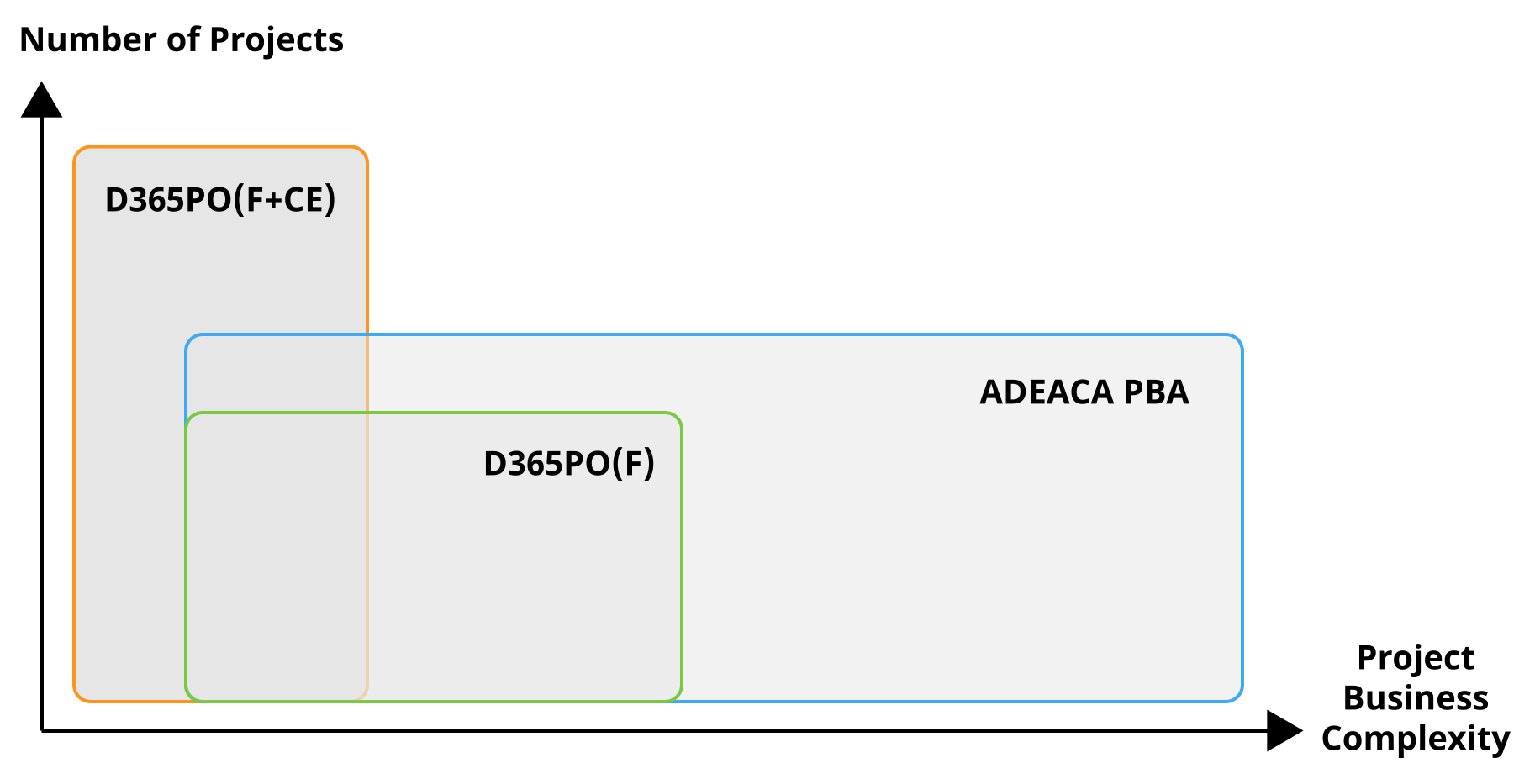
Now, D365PO can be deployed in a couple of different ways. The deployment options are confusing and will limit the functionality in one way or another depending on what you choose. And there is not going back.
As your project business complexity grows as does your needs for more sophisticated systems to manage that business, PlanAutomate delivers the capabilities far beyond what D365PO can do.
A high degree of project business complexity may mean that your projects involve lots of tasks that require sophisticated project scheduling capabilities, change control, or real-time synchronization with procurement, inventory, equipment, and other company functions. It could also mean that your projects span a range of months or even years that require you to close out your project financials monthly, reforecast your projects, or conduct Earned Value Analysis (EVA).
In these cases, D365PO cannot provide the required functionality. The need for more sophisticated tools to manage those processes is necessary. These are the types of business scenarios that PlanAutomate is designed to serve.
Although every organization’s needs are different and there are degrees of complexity, the bottom line is: Project Operations only works for relatively simple, short projects encountered in very few companies. Plus, why would you want to limit your options in the future as you continue to grow. The more complex your projects become, the more you will be stuck in a stale system.
Project “Operations” vs “Financials”
As the name says, Project Operations is focused primarily on the operational side of project management.
However, if you need to manage the financial side of your projects under tight budget control and change management, you will need more. If you need a dedicated cost breakdown structure (CBS), hierarchical budget management, support for your month-end process, or earned value analysis (EVA), you will not find them in Project Operations at all. If you need any of the following, you will need to employ another solution or carry a significant workload of your project business management in spreadsheets.
To summarize, take a look at these three categories to determine if Project Operations will support your business.
Are you a services-based organization?
Are your projects simple and short in duration?
Are you happy running your project financials and cost management in spreadsheets?
Will your organization not grow or need any new capabilities in the future?
If you answered yes to all four questions, then Project Operations may work for you.
If you answered anything other than yes, you need to explore other options. However, buying Dynamics and expecting to make custom modifications to it to suit your business needs is not the right way to go either. This approach will cost you more in the long-run and causes massive headaches and problems keeping up with Microsoft’s cloud deployment timeline. You need a ready-built, project business solution.
Unfortunately, most Project Businesses run their companies through a mess of disconnected, disparate applications. Most don’t even look for a comprehensive business system because they don’t believe it exists, or that “this is the way we have always done it.”
You need to search for more. Don’t accept the status quo.
Don’t buy a business system if it doesn’t support your whole business. If an application only covers a small portion of your needs but you still need to support the bulk of your processes with ancillary apps, tools and spreadsheets, or make massive custom modifications to it, keep looking.
If your goal is to eliminate the need for those spreadsheets and ancillary applications and be able to manage your project business in one comprehensive business system, then PlanAutomate may be right for you.
Related articles
How to Manage Projects in Microsoft Dynamics 365 Finance and Empower Your Entire Project Organization
The LLM Scaling Wall is Here. What’s Next for AI?
Henrik Lerkenfeld
Henrik is a driving force behind the product success of PlanAutomate’s Enterprise Project Management (EPM) solution, bringing a systematic approach to process design and a deep understanding of project-based industries. His work focuses on natively unifying critical project data and processes, including financials, operations, and supply chain, into a single source of truth for project-driven organizations inside Dynamics 365 Finance. His experience spans decades of working with Microsoft ERP systems for project-centric companies. He also leads the services team at Adeaca that implements the Dynamics 365 Finance, Supply Chain Management, and PlanAutomate EPM.
Manage Consent
To provide the best experiences, we use technologies like cookies to store and/or access device information. Consenting to these technologies will allow us to process data such as browsing behavior or unique IDs on this site. Not consenting or withdrawing consent, may adversely affect certain features and functions.
Functional
Always active
The technical storage or access is strictly necessary for the legitimate purpose of enabling the use of a specific service explicitly requested by the subscriber or user, or for the sole purpose of carrying out the transmission of a communication over an electronic communications network.
Preferences
The technical storage or access is necessary for the legitimate purpose of storing preferences that are not requested by the subscriber or user.
Statistics
The technical storage or access that is used exclusively for statistical purposes.The technical storage or access that is used exclusively for anonymous statistical purposes. Without a subpoena, voluntary compliance on the part of your Internet Service Provider, or additional records from a third party, information stored or retrieved for this purpose alone cannot usually be used to identify you.
Marketing
The technical storage or access is required to create user profiles to send advertising, or to track the user on a website or across several websites for similar marketing purposes.
To provide the best experiences, we use technologies like cookies to store and/or access device information. Consenting to these technologies will allow us to process data such as browsing behavior or unique IDs on this site. Not consenting or withdrawing consent, may adversely affect certain features and functions.
Functional
Always active
The technical storage or access is strictly necessary for the legitimate purpose of enabling the use of a specific service explicitly requested by the subscriber or user, or for the sole purpose of carrying out the transmission of a communication over an electronic communications network.
Preferences
The technical storage or access is necessary for the legitimate purpose of storing preferences that are not requested by the subscriber or user.
Statistics
The technical storage or access that is used exclusively for statistical purposes.The technical storage or access that is used exclusively for anonymous statistical purposes. Without a subpoena, voluntary compliance on the part of your Internet Service Provider, or additional records from a third party, information stored or retrieved for this purpose alone cannot usually be used to identify you.
Marketing
The technical storage or access is required to create user profiles to send advertising, or to track the user on a website or across several websites for similar marketing purposes.